
A swimmer development dashboard is only as good as the data feeding it. Most university programs still track progress with stopwatches, spreadsheets typed up after the session, and coach memory. That works for meet results. It doesn’t work for real development tracking, because you can’t build trend lines from data you never captured consistently.
The fix isn’t a fancier spreadsheet template. It’s automating the metric capture itself, so every practice swim generates the same clean data set a meet swim would.
What goes into a real swimmer development dashboard
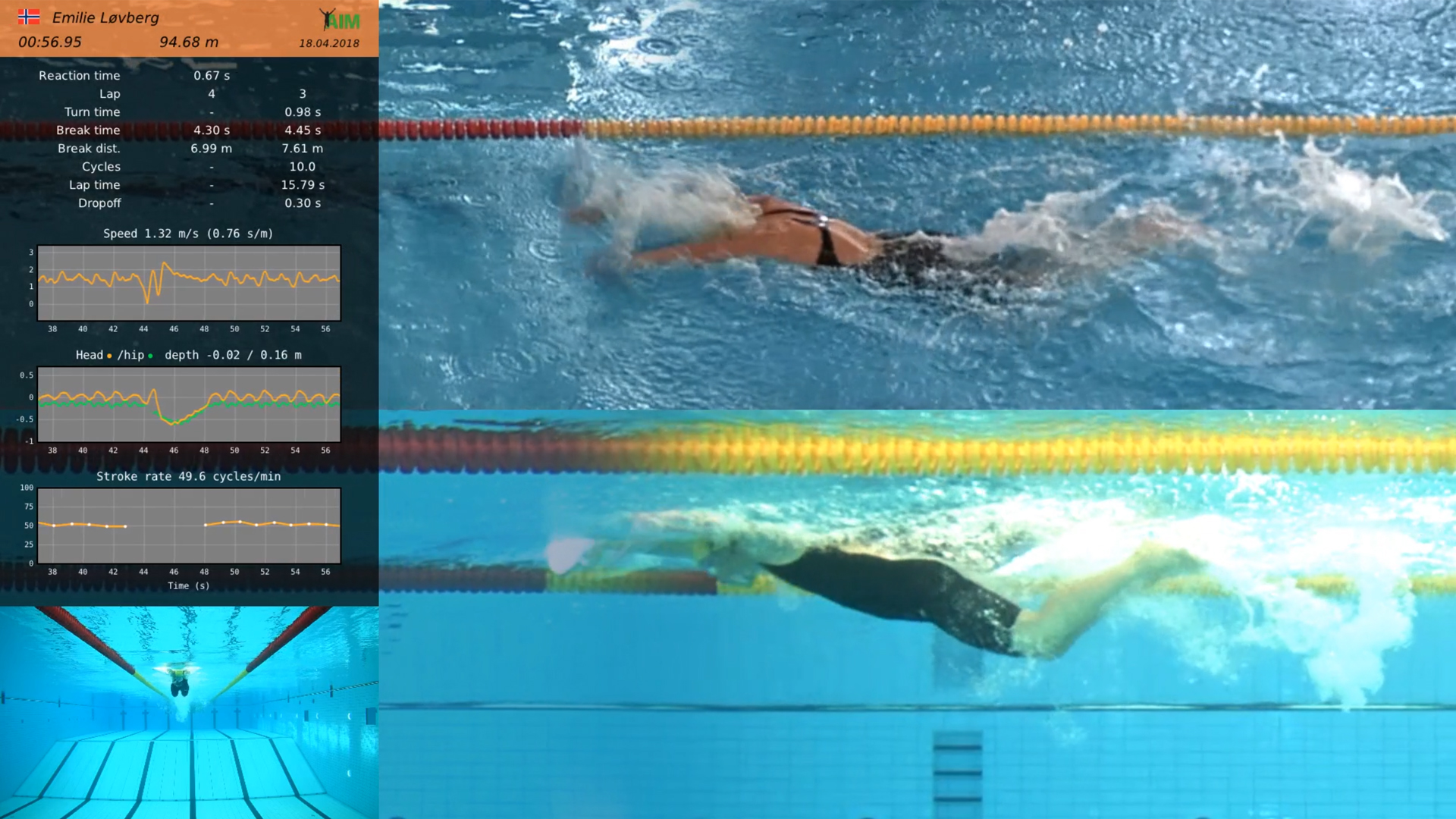
A development dashboard needs four things to be useful over a season: turn time, breakout time and distance, stroke count and rate, and dropoff. These four metrics, tracked lap by lap, tell you far more than a final time ever will.
- Turn time — head-entry to push-off for freestyle and backstroke, hand-touch to push-off for breaststroke and butterfly.
- Breakout time and distance — how long the underwater phase lasts and how far the swimmer travels before the head surfaces.
- Stroke count and stroke rate — per lap, tracked as a continuous graph through the whole swim.
- Dropoff — the change in lap time compared to the previous lap, which shows where a swim actually falls apart.
Individually, each metric is useful. Together, tracked across weeks and months, they become a profile of how a swimmer is actually developing — not just whether they went best time on Saturday.
Why manual tracking breaks this down
A coach with a stopwatch can catch turn time on a good day. They can’t catch it for every swimmer, every lap, every practice, all season. As a result, most programs end up with a handful of hand-timed data points and a lot of gaps.
Automated capture solves that gap problem directly. AIM Systems runs on 11 to 22 fixed cameras, depending on pool length, and integrates with the Omega timing system already installed in most university pools. Because it uses touchpad data for timing, there’s no separate system to reconcile.
Every automated capture — for one swimmer in one lane at a time — outputs a stitched video with data overlaid, plus a spreadsheet of the underlying stats. That spreadsheet is your dashboard’s raw material, generated automatically instead of typed in after the fact.
Turning captures into a trend line
A single swim gives you a snapshot. A season of swims gives you a trend. Because AIM Systems compares each swim lap-by-lap against a swimmer’s own past times, another swimmer’s times, or a manually entered reference, you can watch turn time or breakout distance move week over week instead of guessing from memory.
The underwater phase is where this matters most. Markerless, camera-only tracking reads breakout distance and underwater speed after the start with a precision a stopwatch simply can’t match — no wearables, no motion-capture markers, nothing on the swimmer at all.
For a program building a real development dashboard, that’s the actual gap to fill: not another spreadsheet tool, but a consistent, automated source of the metrics that matter — turn time, breakout, stroke rate, and dropoff — captured the same way every single time.
If your program is trying to move from occasional stopwatch data to a real season-long dashboard, it’s worth a conversation. Get in touch with AIM Systems to talk through what a fixed installation would look like at your pool.
Frequently asked questions
What metrics should a swimmer development dashboard track?
Turn time, breakout time and distance, stroke count and rate, and lap-time dropoff are the four core metrics for tracking development over a season.
How does AIM Systems automate swim metric capture?
It uses 11 to 22 fixed cameras integrated with a pool’s existing Omega timing system to automatically produce a stitched video and stats spreadsheet for each swim.
Can automated race metrics replace stopwatch tracking for university programs?
Yes, because automated capture records the same metrics consistently for every lap and every swimmer, unlike manual stopwatch tracking which only catches partial data.
Social Contact